A simpler, cheaper SoundSource alternative for Mac
If you’ve gone looking for a per-app audio tool on the Mac, you’ve met SoundSource. It’s Rogue Amoeba’s menu-bar app, it’s been around for years, and it’s genuinely very good. It’s also $47 and does a lot. If you found yourself hovering over the buy button wondering whether you actually need all of it, this post is for you.
I’ll be straight with you up front: SoundSource is the more powerful tool, and for some people it’s the right one. The question isn’t which app is better. It’s which one matches what you actually do with sound all day.
What SoundSource does
SoundSource gives every running app its own real volume slider. Not a mute, not a rough level cut, but a true variable fader: you can set Chrome to 40% and leave it there. On top of that it does audio routing (send this app to those headphones, that app to the speakers), per-app equalizers, and a stack of audio effects. Rogue Amoeba has been building Mac audio software for two decades, and it shows. The routing and effects work is the deep end of the pool, and almost nobody else does it as cleanly.
That power is also the catch. It’s $47, and most of the interface is there to serve features many people will never touch. If you need per-app EQ and routing, that price is a bargain and you should just buy it. If you’re not sure what routing is for, keep reading.
The thing most people actually want
Here’s what I hear from most people who go looking for a volume mixer on the Mac. They have several things making noise at once, and they want to:
- See which apps are playing, at a glance, with live level meters.
- Mute the one that’s being obnoxious, instantly, without hunting through its settings.
- Control the music turn Spotify or Apple Music up or down and hit pause without leaving what they’re doing.
That’s the common case. And notice it doesn’t actually require a variable fader on every single app. What it requires is visibility, a fast mute, and proper control over your music. Once you frame the need that way, $47 of routing and EQ starts to look like a lot of app for the job.
Where MixDesk fits
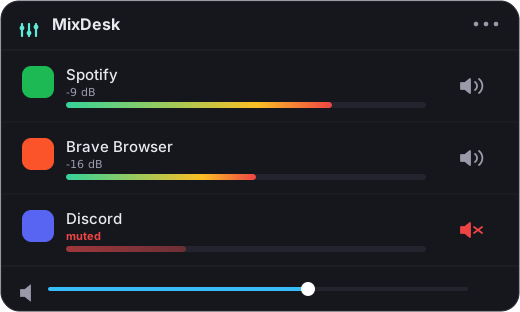
MixDesk is built for exactly that common case, and deliberately not for more. Click the menu bar and you get:
- Live meters for every app making sound, so you can see what’s going on. (How to see which apps are using audio)
- Instant per-app mute for anything browsers, games, calls, any app at all. It’s a real mute that diverts that app’s audio away from your speakers using Apple’s Core Audio process-tap API, not a system-wide fudge. (How to mute a specific app on a Mac)
- A volume slider and transport controls for Spotify and Apple Music set the level, play, pause, skip, all from the menu bar.
Let me be equally honest about the trade. MixDesk does not give you a variable volume slider for arbitrary apps. You can’t set Chrome to 40% in MixDesk the way you can in SoundSource. For non-music apps, the controls are meters plus mute. The full per-app fader for everything is exactly the thing SoundSource does that MixDesk doesn’t, and if that specific feature is what you need, SoundSource is your answer, not this.
The honest comparison
So the split is pretty clean:
- Buy SoundSource if you want a true variable volume slider for every app, audio routing between devices, or per-app EQ and effects. It’s excellent and mature, and $47 is fair for what it does.
- Try MixDesk if what you really want is to see your levels, mute anything on the spot, and control your music without a full audio workstation in your menu bar. It’s $9 once, not a subscription, with a 14-day free trial.
Both are sold directly rather than through the Mac App Store, and for the same reason: reading other apps’ audio needs access Apple’s App Store sandbox forbids. That’s normal for this category. It’s also worth knowing there’s a free option, Background Music, which is open-source but can be finicky and isn’t actively maintained, so weigh that before you rely on it.
Picking well
The good news is you can’t really get this wrong, because both apps let you try before you pay. If you suspect you need routing or per-app EQ, start with SoundSource: you’ll know within a day whether you use it. If you mostly want a clean menu-bar answer to what’s making noise and how to quiet it, MixDesk is the lighter, cheaper fit, and it’s native to macOS 14.2’s audio-tap API with everything processed on-device.
MixDesk is $9 once, with a two-week free trial, at mixdesk.app. Run it alongside your music for an afternoon and see if it covers what you were about to spend $47 on.
Related reading
MixDesk does this for you
A menu-bar mixer with live meters and per-app mute. Free for 14 days.
Try MixDesk free