How to see which apps are using audio on your Mac
Some phantom sound is playing and you have no idea which of your twenty open windows is responsible. It’s a weirdly common Mac moment. macOS doesn’t show which app is currently making noise anywhere obvious, so you’re left clicking around until it stops.
There are a few ways to track it down, from quick guesses to actually seeing a live list.
Check for the audio indicator on browser tabs
If you had to bet, bet on a browser. Autoplaying video is the number one source of mystery sound. Safari, Chrome, and Brave all show a small speaker icon on any tab that’s playing audio. Scan your open tabs for it. In Chrome and Brave you can also right-click a tab to mute it once you find the culprit.
This solves it maybe half the time. The other half, it’s not a browser.
Look in Activity Monitor (sort of)
Activity Monitor won’t tell you that an app is playing sound, but a process that’s suddenly using more CPU or energy can be a hint. Open it, sort by CPU, and see if anything spikes when the sound is going. It’s indirect and easy to misread, so treat it as a clue rather than an answer.
Use the Sound settings and your ears
Open System Settings, then Sound, and play with the output while the noise is going. It won’t identify the app, but confirming which output device the sound is on can at least tell you whether it’s coming from your Mac at all, versus a Bluetooth speaker or a second display.
See a live list of every app making sound
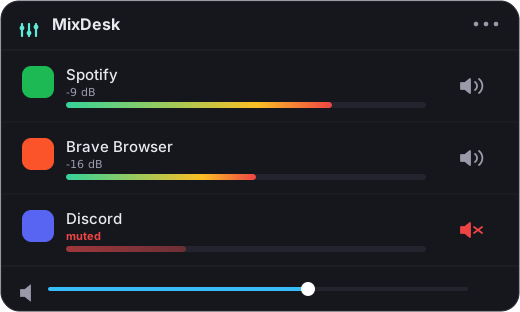
This is the real answer, and it’s the thing macOS should just show you. A menu-bar mixer keeps a running list of every app producing audio, with a live meter next to each one. The app that’s making noise is the one with a moving bar.
MixDesk is built around exactly this. Open it and you get a real-time readout: Spotify at this level, a browser tab at that level, and anything else playing shows up right there too. When some app starts playing, it shows up within a second, meter bouncing. No guessing, no clicking through windows. And once you’ve spotted the source, you can mute it right there without switching to it.
It reads this using the audio-tap API Apple added in macOS 14.2, so it’s seeing the same signal your speakers get. One detail: it lists real apps, so a browser tab shows up under the browser rather than as its own line, since the browser is the app actually producing the sound.
Related reading
- How to mute one app on a Mac without muting everything
- How to control the volume of individual apps on a Mac
Frequently asked questions
Is there a way to see every app using audio at once?
Yes. MixDesk keeps a live list in your menu bar of every app producing sound, each with a real-time level meter. The app that's making noise is the one with a moving bar, so you don't have to click through windows to find it.
Does Activity Monitor show which app is playing sound?
Not directly. Activity Monitor doesn't flag audio; a process using more CPU or energy can be a hint, but it's easy to misread. A menu-bar mixer that reads Core Audio is far more reliable for spotting the source.
Why does a browser tab show up under the browser instead of on its own?
MixDesk lists real apps, and the browser is the process actually producing the sound. So all tabs appear under the browser. Once you spot it there, you can mute the whole browser in one click, or mute the specific tab from inside the browser.
MixDesk does this for you
A menu-bar mixer with live meters and per-app mute. Free for 14 days.
Try MixDesk free