How to mute a browser (Chrome, Safari, Firefox) on your Mac
You know the moment. You’ve got fifteen tabs open, you click a link, and suddenly a video ad is blaring at full volume. You don’t remember opening anything with sound. Now you’re frantically clicking through tabs trying to find the one that’s making noise before your whole office turns around.
Every browser gives you some way to shut this up, and it’s worth knowing them. But they all share the same weakness, so let’s start with the built-in tricks and then talk about the faster fix.
Mute a single tab in Chrome, Safari, or Firefox
Each browser hangs a little speaker icon on any tab that’s playing audio, and clicking near it mutes that tab.
Chrome: A tab making noise shows a speaker icon on the right side of the tab. Right-click the tab and choose Mute site, or just click the speaker icon (depending on your Chrome version). The tab stays muted until you unmute it.
Safari: When a tab is playing audio, a blue speaker icon appears in the Smart Search bar, and a small one shows on the tab itself. Click the speaker in the address bar to mute that tab. Click and hold it, and Safari will even offer to mute all other tabs, handy when you can’t tell which one is the culprit.
Firefox: Firefox puts a speaker icon right on the noisy tab. Click it once to mute, click again to unmute. Simple and reliable.
These work well when you can see the offending tab. The problem is that you often can’t.
Why the built-in mute isn’t always enough
The tab speaker icon only helps if the tab is visible. If the noise is coming from a tab that’s scrolled off the edge of a crowded tab bar, or hidden in another window, or in a different Space entirely, you’re back to hunting.
There’s also a subtler issue. Muting one tab does nothing about the next autoplay video in a different tab. Site settings help a little here: in Chrome you can go to a site’s settings and block sound, and Safari lets you set “Auto-Play” to Never Auto-Play per site under Settings for This Website. Those are great long-term habits, but they’re per-site, they take a few clicks each, and they don’t do anything in the ten seconds you actually need silence right now.
What you usually want in that moment isn’t to mute this specific tab. It’s to make the browser shut up right now, so you can sort out which tab it was later.
Mute the whole browser in one click
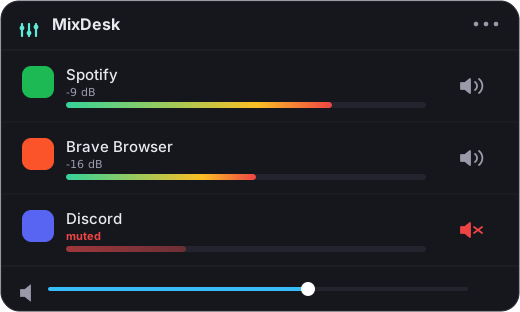
This is the gap MixDesk fills. MixDesk is a small menu-bar volume mixer for macOS. It lists every app that’s currently making sound (Chrome, Safari, Firefox, whatever) with a live level meter next to each one, and a mute button.
So when the mystery ad starts, you don’t go tab-hunting. You click the MixDesk icon in the menu bar, see that Chrome is the thing lighting up the meter, and hit mute. The entire browser goes silent in one click, from anywhere, without you ever finding the tab. When you’re ready, you unmute it just as fast.
A couple of things worth being clear about, because honesty matters more than hype:
- MixDesk’s mute is a real per-app mute. It uses Apple’s Core Audio process-tap API (the one added in macOS 14.2) to divert the browser’s audio away from your speakers. It’s not just turning the system volume down, and it works for any app, not only browsers.
- MixDesk does not give you a variable volume slider for a browser: you can’t set Chrome to 40%. For apps like browsers, games, and calls, what you get is a live meter plus instant mute. (Variable per-app volume sliders in MixDesk are reserved for music apps that support scripting, like Spotify and Apple Music.)
For the specific job of killing the noise now, meter-plus-mute is exactly the tool you want. You can see which app is guilty and silence it faster than you can find the tab.
When to use which
If you already know which tab is the problem and you want it muted for good, the browser’s own per-tab mute and per-site auto-play settings are the right call: they’re free and built in. Use them.
If you’re constantly getting ambushed by sound and you’re tired of playing hide-and-seek with your tabs, a menu-bar mixer that shows you every noisy app and lets you mute any of them instantly is worth the small cost. That’s the whole idea behind MixDesk: see what’s making sound, and mute anything in one click. It runs on macOS 14.2 and later on Apple silicon, processes everything on-device, and it’s $9 once with a 14-day free trial.
Either way, you never have to sit through another surprise autoplay ad at full volume.
Related reading
MixDesk does this for you
A menu-bar mixer with live meters and per-app mute. Free for 14 days.
Try MixDesk free