A Background Music alternative for macOS
If you’ve spent any time looking for a way to control audio per app on a Mac, you’ve almost certainly run into Background Music. It’s free, it’s open source, and for years it was the answer everyone pointed to. It’s also the app people quietly go searching to replace, usually after it stops working one day for no obvious reason.
So let’s be fair about what Background Music is, why it breaks, and what you can reach for instead.
What Background Music gets right
Credit where it’s due: Background Music is genuinely useful and it costs nothing. It gives you a per-app volume list, it auto-pauses your music when other audio starts, and it’s fully open source, so you can read exactly what it does. For a free tool built and maintained by volunteers, that’s a lot of value, and plenty of people have run it happily for years.
If it’s working for you today and you don’t mind the setup, there’s no urgent reason to switch. This post is for the other group.
Why it breaks
The catch is in how Background Music works. To sit between your apps and your speakers, it installs a virtual audio driver, a system-level component that all your sound gets routed through. That’s the source of both its power and its fragility.
Because it’s a driver, it’s tightly bound to the exact version of macOS you’re running. Every major macOS update is a chance for something to shift underneath it, and the classic symptoms follow: sound disappears entirely, your output device vanishes from the menu, audio keeps routing to the wrong place, or the app just silently stops doing anything. The usual fix is a dance of reinstalling the driver, restarting Core Audio, or rebooting, and sometimes that’s not enough.
The other issue is maintenance. Background Music is a community project, and development has been slow and sometimes stalled for long stretches. When a new version of macOS lands and something breaks, there’s no guarantee a fix arrives soon, or at all. That’s the honest trade you make with an unpaid, volunteer-run driver.
The no-driver approach
Here’s the thing that’s changed since Background Music was designed: you no longer need a driver to do this.
In macOS 14.2, Apple shipped a public audio-tap API that lets an app read and redirect what another app is sending to the speakers, directly and without anything installed underneath the system. That’s the hard part of building a mixer, and Apple now provides it as a supported, documented interface. An app built on it doesn’t route your entire sound system through a fragile virtual device, so there’s nothing to fall out of sync when macOS updates.
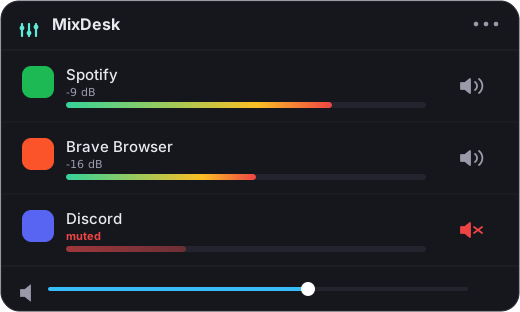
That’s the foundation MixDesk is built on. It lives in your menu bar and shows a live level meter for every app currently playing sound, so you can actually see what’s making noise, and it lets you mute any app instantly with one click. No driver, no system extension, no reboot to install. Because there’s nothing sitting in your audio path, there’s nothing to break the next time Apple ships an update.
For Spotify and Apple Music specifically, MixDesk adds a volume slider and transport controls, so you can turn your music down or skip a track without leaving the menu. It’s worth being straight about the limits, though: for other apps, MixDesk gives you meters and instant mute, not a variable percentage slider. If your one must-have is setting Chrome to exactly 40 percent, that’s a different tool (see below).
Free versus paid
The obvious difference: Background Music is free, and MixDesk is $9 one time, with a 14-day trial and no subscription.
It’s fair to ask what the $9 buys when the alternative is free. Roughly, it buys the things that make software keep working: it’s notarized by Apple so it launches cleanly, it’s actively maintained so macOS updates get handled, and there’s someone to email when something’s off. Whether that’s worth nine dollars depends on how many afternoons you’ve lost to audio that suddenly stopped working.
Worth noting: like Background Music, MixDesk isn’t on the Mac App Store, and for the same reason. Reading another app’s audio needs access Apple’s sandbox forbids, so it’s sold direct from mixdesk.app. All the audio processing happens on your Mac and never leaves it.
Other options
MixDesk isn’t the only paid route. SoundSource from Rogue Amoeba (around $47) does full variable per-app volume for every app plus output routing. It’s more capable than either MixDesk or Background Music, and priced to match. If you need true per-app percentage control across all your apps, it’s the heavyweight to look at.
MixDesk’s niche is narrower on purpose: see what’s playing, mute anything, control your music, no driver, cheap. If that’s the shape of what you need, it’s a clean replacement for a Background Music setup that’s stopped cooperating.
The short version
Background Music is a solid free tool, but it leans on a virtual audio driver that ties it to each macOS release and, with slow maintenance, tends to break over time. If yours has stopped working, or you’d just rather not run a driver at all, a native menu-bar app like MixDesk covers the everyday case: live meters, instant mute on any app, and volume plus transport for Spotify and Apple Music, built on the audio API Apple added in macOS 14.2. Free trial for two weeks, then $9 once.
Related reading
MixDesk does this for you
A menu-bar mixer with live meters and per-app mute. Free for 14 days.
Try MixDesk free