Why doesn't macOS have a volume mixer like Windows?
Windows shipped a per-app volume mixer with Vista, back in 2007. Right-click the speaker, and every app gets its own slider. Nearly twenty years later, macOS still hasn’t added the equivalent. If you’ve switched from a PC, this is one of those small things that quietly drives you up the wall.
So why the gap?
It isn’t a technical limitation
The usual guess is that macOS just can’t do it. That’s not true. Under the hood, Core Audio has always known which process is producing which sound. The system tracks it all. Apple simply chose not to expose a mixer in the interface, and that decision has stuck around release after release.
You can see the proof in Apple’s own recent work. In macOS 14.2, Apple added a public audio tap API that lets an app read exactly what another app is sending to the speakers. That is the hard part of building a mixer, and Apple built it and documented it. They just didn’t put a mixer of their own on top of it.
The likely reason: Apple’s taste for one simple control
This is the part that’s opinion, but it lines up with how Apple designs everything. Apple tends to ship the single control that covers the common case and leave the power-user features to the interface underneath. One volume key. One slider in Control Center. It’s clean, and for a lot of people it’s genuinely enough.
The trouble is, being enough doesn’t last past the moment you have more than one thing making noise, which on a modern Mac is most of the time. Music, a call, a game, six browser tabs. One slider can’t sort that out, and Apple’s answer has been to let you deal with it app by app.
Why third-party apps fill the gap
Because the demand is real, a small industry of Mac audio tools grew up to add the missing mixer. You’ll see names like SoundSource, Background Music, and eqMac.
Here’s a detail worth knowing if you go shopping: none of these are on the Mac App Store, and that’s not an accident. Reading and controlling another app’s audio needs access that Apple’s App Store sandbox doesn’t allow. So every one of them is sold directly by its maker. If you were waiting for the official App Store option, it isn’t coming, for the same reason the mixer isn’t built in.
The short version
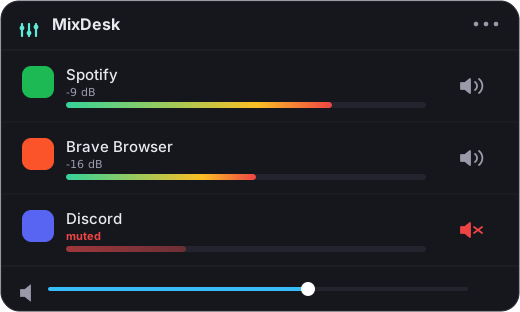
The Mac doesn’t have a volume mixer because Apple decided one system slider was enough, not because the platform can’t do it. If it isn’t enough for you, a menu-bar mixer like MixDesk adds the per-app sliders and meters you’re used to, using the same audio API Apple shipped in macOS 14.2. Two-week free trial, then $9 once.
Related reading
Frequently asked questions
Can macOS technically do a per-app volume mixer?
Yes. Core Audio has always tracked which process produces which sound, and in macOS 14.2 Apple shipped a public audio-tap API that lets an app read another app's audio. Apple simply chose not to build a mixer of its own on top of it.
Why isn't there a Mac volume mixer on the Mac App Store?
Reading and controlling another app's audio needs access that Apple's App Store sandbox forbids. That's why every serious Mac audio tool, including MixDesk, is sold directly by its maker rather than through the App Store.
What can I use instead of a built-in mixer?
A menu-bar mixer like MixDesk adds live per-app meters, one-click mute for any app, and volume sliders for scriptable music apps like Spotify and Apple Music. It runs on macOS 14.2+ and costs $9 once after a 14-day trial.
MixDesk does this for you
A menu-bar mixer with live meters and per-app mute. Free for 14 days.
Try MixDesk free