One app is way too loud on your Mac? Here's how to fix per-app audio
You had everything set nicely, then one app came in at twice the volume of everything else: a notification chime that makes you jump, a game that’s fine until a cutscene blows the speakers out, or a tab that autoplays an ad at full blast while your music sits at a reasonable level. The mix was fine a second ago, and now one thing is drowning out the rest.
The obvious move is to grab the volume keys. But that turns everything down together, so the loud app is still loud relative to everything else, just quieter overall. The uneven part doesn’t go away. That’s the frustrating bit: the problem is one app being out of proportion, and the one control macOS hands you can’t touch a single app.
Why the Mac only gives you a master slider
Apps don’t ship at a matched volume. Each one decides how loud its own output is, and there’s no shared reference they all agree on. A video call normalizes voices to sit in a comfortable range. A game mixes for drama, so quiet stretches and loud stretches are far apart on purpose. A browser just plays whatever the page throws at it, ad included. Put three of those together and of course one sticks out.
macOS doesn’t step in to even that out. Under the hood, Core Audio knows exactly which app is producing which sound, but Apple never built an interface that lets you set volume app by app. You get one system slider that scales the whole mix at once. That’s great when there’s one thing playing and useless the moment the balance between apps is the actual problem.
What you can actually do today
A few things help, and none of them need extra software.
Turn the loud app down inside its own settings. If the offender has its own volume control, this is the cleanest fix. Drop the game’s master slider, or lower the volume on the video you’re watching, and you’ve solved it at the source. The catch is that plenty of apps don’t expose a volume at all, so there’s nothing to grab.
Mute the loud one for a moment. If an app is only occasionally too loud, muting it when it flares up and unmuting later is a blunt but effective trick. macOS doesn’t offer a per-app mute either, but it gets you out of the immediate jump-scare.
Check system sound settings for the chimes. If it’s notification and alert sounds that are too loud, System Settings has a separate slider for those under Sound. That won’t help with apps, but it’s worth knowing the alert volume is its own thing.
The gap in all of this is speed and reach. You’re hunting through menus to find which app is even responsible, and for the apps with no volume control of their own, the manual approach leaves you stuck.
See which app is loud, then fix it in one move
The faster way is to see the whole mix at once and act on the offender directly. That’s the idea behind a menu-bar mixer.
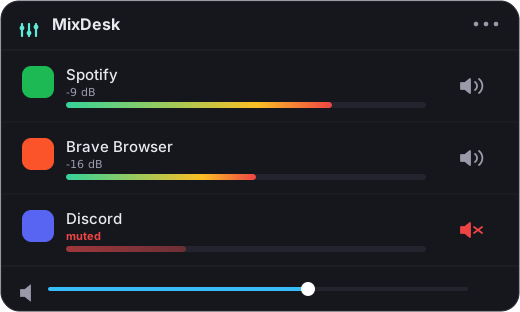
In MixDesk, every app that’s making sound shows up in one list with a live level meter next to it. When something is too loud, you don’t have to guess which app it is. The meter that’s pinned to the top tells you instantly. From there you mute that app with a single click, no matter what it is, browser, game, call, or anything else, because the mute works on any app’s audio, not just ones that expose a volume setting.
If the loud thing is your music, MixDesk goes a step further. For Spotify and Apple Music it gives you a real volume slider and play/pause controls right in the panel, so you can pull the music down a notch instead of muting it outright and keep it under whatever you’re focused on.
To be straight about the limits: MixDesk doesn’t add a variable volume slider to every app. For non-music apps the universal controls are the meters plus an instant mute, and the volume slider is for Spotify and Apple Music specifically. That combination covers the uneven-loudness problem well: spot the offender on the meters, mute it if it’s not your music, or turn the music down if it is.
How it works, briefly
MixDesk reads app audio through the audio-tap API Apple added in macOS 14.2. There’s no driver, no system extension, nothing installed deep in the OS, and the audio is processed on your Mac and never leaves it. It needs macOS 14.2 or later on Apple silicon. It’s not on the Mac App Store, because reading other apps’ audio needs access the sandbox forbids, so it’s sold direct for $9 once, with a 14-day free trial.
If you want to keep reading, How to balance sound between apps on macOS covers setting the ratio between apps deliberately, and How to control the volume of individual apps on a Mac walks through the per-app options in more depth. If the one-loud-app problem keeps catching you off guard, the trial is the cheapest way to see whether having every app on one screen fixes it for you.
MixDesk does this for you
A menu-bar mixer with live meters and per-app mute. Free for 14 days.
Try MixDesk free